A good worksheet asks one thing per board and leaves no doubt about whose turn it is.
Here you can plan a sheet, build it with the Board builder, print it or save it as a PDF, and test each position before anyone else sees it.
Choose positions with one answer
Pick boards that match one skill and that have a single correct reply. Fewer pieces help beginners, because they can focus on the idea instead of hunting for it. Build your own positions or take moments from your group's games.
Order the boards by difficulty. Open with one that almost everyone solves, so that nobody gives up at the start, and finish with one that needs careful thought. Decide before you build how long the activity should last and cut anything that does not fit.
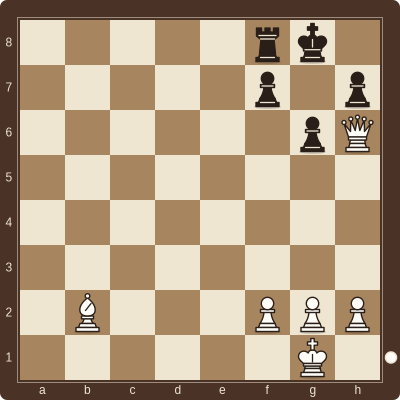
5rk1/5p1p/6pQ/8/8/8/1B3PPP/6K1 w - - 0 1Only Qg7# works, with the bishop on b2 protecting the queen. Compare it with the next board, where the same wording would cause trouble.
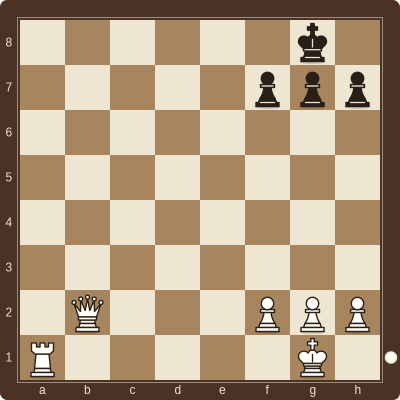
6k1/5ppp/8/8/8/8/1Q3PPP/R5K1 w - - 0 1Both Qb8# and Ra8# mate. A student who finds the other one is right, and an answer key listing one move would mark them wrong. Remove a piece, move it or accept both answers in the key.
One question per diagram
Write a short instruction under each board and ask for something a student can write down. Vague prompts such as what would you do leave beginners guessing what you are after.
| Skill | Clear question | Expected answer |
|---|---|---|
| Mating pattern | Mate in one | One move |
| Rules | Checkmate, stalemate or neither? | One word |
| Tactics | Win material | First move |
| Safety | What does Black threaten? | A move |
Mix question types so students must think about the position and not just repeat a trick.
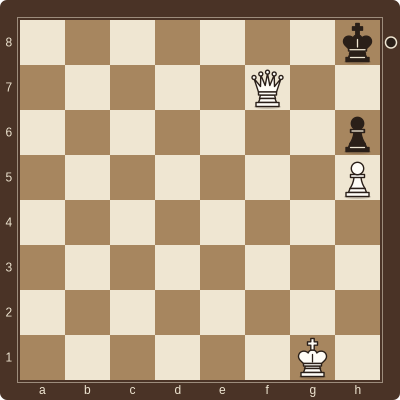
7k/5Q2/7p/7P/8/8/8/6K1 b - - 0 1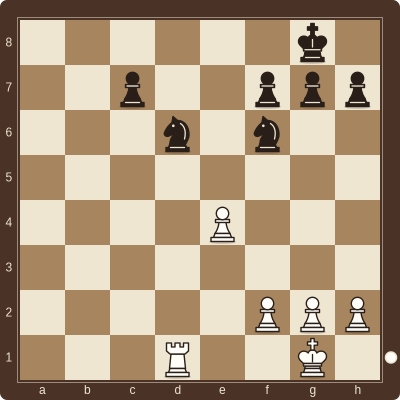
6k1/2p2ppp/3n1n2/8/4P3/8/5PPP/3R2K1 w - - 0 1In the second question the black king is not in check but has no safe square, and the h6 pawn is blocked, so it is stalemate. Checkmate or stalemate is a handy reference if the class mixes the two up.
The third question has a single winning idea: the e-pawn advances and attacks both knights at once. Whatever Black tries, White comes out ahead by at least a knight for a pawn.
Show whose turn it is
The same pieces can give a different answer with the other side to move. Set the side to move in the builder for every position. The print sheet states White to move or Black to move under each diagram, so check that it says what you intend.
Keep one orientation across the sheet, with White at the bottom, unless you want students to practice reading from the other side. Reading a chess diagram helps pupils who find the coordinates confusing.
Some questions depend on things a diagram cannot show, such as whether a side may still castle or capture en passant. Set those fields in the builder as well, and state them in the question, so that no student has to guess.
Write the answer key
Make the key while the positions are fresh, on a separate page. For each number give the move or word, and one line saying why, so that you can discuss it afterward.
| No. | To move | Question | Answer |
|---|---|---|---|
| 1 | White | Mate in one | Qg7#, the bishop protects the queen |
| 2 | Black | Which is it? | Stalemate, no legal move and no check |
| 3 | White | Win material | e5, attacking both knights |
Add a short note on the likely wrong answers. For the third board, a student may suggest taking a knight with the rook, but the c7 pawn would take the rook back. Having that ready lets you turn a mistake into the next lesson.
Print or save as PDF
In the Board builder, save each question as a position. Then select several saved positions and print a sheet, or choose save as PDF in the print dialog of your browser. You can also download a single diagram as a PNG picture and place it in a document of your own.
- Give each position a neutral name, such as Worksheet 1, board 3.
- Select the positions you want on the sheet.
- Open the print preview and check which words appear next to the boards.
- Remove anything that reveals an answer: use Rename to change the title or note, or switch off Print titles and notes.
- Print, or save the PDF and open it once to make sure it looks right.
Remember that saved positions are kept only in this browser. If you plan to teach from another computer, take the PDF with you or keep the FEN strings. The study notebook page explains how to back them up.
The sheet places diagrams two across and has no setting for answer space, so let students answer on separate paper. If you want writing lines under each board, put downloaded PNG pictures in a document of your own.
Check every position first
The Board builder has no analysis engine and does not suggest moves, so testing is your job. Set each board up on a real set and try the answer, then try the most tempting wrong moves.
Then reverse the process: rebuild every board from the printed page. This catches a mirrored diagram, a missing pawn or a wrong color that you stopped noticing after looking at your screen.
Before you hand it out
- Every piece matches the position you meant to show.
- The side to move is stated and correct.
- The side that is not moving is not in check.
- There is exactly one answer, or the key lists them all.
- No title or note on the page gives the answer away.
A second pair of eyes helps. Ask someone to solve the sheet cold and listen to where they hesitate: confusion about the wording shows up quickly that way.
Common mistakes on worksheets
- Missing side to move. Students cannot start without it.
- Two correct answers. Test for other mates and other captures.
- Vague prompts. Say exactly what to find.
- Answers in view. Check names and the preview before printing.
- All the same difficulty. Start easy and end with one that takes thought.
Keep the finished sheets. If your group enjoyed a board, tag it in your notebook and bring it back later, using the ideas in tagging and reviewing.
Common questions
How do I make a printable chess worksheet?
Save each position, tick several of them and print a sheet from the Board builder. Give every board a clear question and check the side to move printed under it.
Can I save the sheet as a PDF?
Yes. Choose the save as PDF option in the print dialog of your browser.
How many diagrams should go on one page?
The Board builder prints diagrams two across, so tick only the positions you need. A handful is a sensible start for beginners; check the print preview.
Can the Board builder check my answers?
No. It has no analysis engine, so verify each solution yourself before the lesson.
Sources
- FIDE Laws of Chess taking effect from 1 January 2023. International Chess Federation (FIDE) Handbook. Rules of movement (Article 3), end of the game (Article 5), recording moves (Article 8), drawn positions (Article 9) and algebraic notation (Appendix C). Consulted on 25 November 2026.
- Portable Game Notation Specification and Implementation Guide. Coordinated by Steven J. Edwards. Standard algebraic notation (section 8.2.3) and the FEN position format (section 16.1). Consulted on 25 November 2026.